
Introduction to AWS Amplify
As frontend developers take on more responsibility for delivering end-to-end experiences, building full-stack applications with AWS Amplify has become an increasingly popular approach. With the launch of Amplify Gen 2, it’s now easier than ever to integrate with cloud services without the usual backend complexity. Developers can define their data models, authentication, storage, and functions directly in TypeScript, streamlining the entire cloud-native development process.
At Compileinfy, we leverage our extensive expertise in cloud technologies and modern application development to build powerful, scalable, and secure solutions for our clients. Our commitment to utilizing cutting-edge tools like AWS Amplify Gen 2 reflects our dedication to efficiency, robustness, and delivering exceptional user experiences. This article demonstrates our approach through Hero FAQ, a comprehensive form management platform that showcases authentication and data management best practices using real-world implementation.
Hero FAQ: A Real-World Implementation with AWS Amplify Gen 2
Hero FAQ is a powerful platform for form management and user interaction that we’ve built to demonstrate the capabilities of AWS Amplify Gen 2. The complete implementation is available in our repositories:
The Hero FAQ project focuses on form management, user authentication, and data storage with these core objectives:
User Authentication & Management: Implement robust sign-up and sign-in processes using AWS Cognito, manage user accounts securely, and apply role-based access control to differentiate between administrators and regular users.
Form Management: Enable users with specific roles (particularly Admins) to create, update, and delete forms dynamically, while providing functionality to add, edit, or remove questions within forms through an intuitive interface.
Data Storage & Access: Utilize AWS DynamoDB to store user accounts, form definitions, form questions, and user responses, with access management based on user roles and permissions.
Admin Capabilities: Provide a comprehensive dashboard for users with admin roles to view responses, manage data, and access analytics within defined permissions, ensuring proper data governance.
Setting Up Your Development Environment
Before diving into the Hero FAQ implementation, ensure your development environment meets the required specifications for AWS Amplify Gen 2.
Prerequisites:
- AWS Account: Active AWS account with appropriate permissions for creating resources
- AWS CLI: Configured with your credentials (aws configure)
- Node.js: v18.16.0 or later
- npm: v6.14.4 or later
- git: v2.14.1 or later
AWS Configuration:
Ensure your AWS CLI is properly configured with credentials that have permissions to create and manage AWS resources including DynamoDB, Cognito, AppSync, and Lambda functions. You can verify your configuration by running:
aws sts get-caller-identity
Initialize New Project with AWS Amplify Gen 2:
Starting with a new project is the most straightforward approach to working with AWS Amplify Gen 2. The npm create amplify@latest command sets up a complete project structure with all necessary dependencies, configuration files, and a basic backend setup. This approach automatically generates the required folder structure, installs all dependencies, and creates a foundational backend.ts file that serves as the central configuration point for your application’s backend services.
npm create amplify@latest
Manual Setup for Existing Projects:
For existing projects, manual setup provides more control over the integration process. This approach allows you to incrementally add AWS Amplify capabilities to your current codebase without disrupting existing functionality. The manual setup requires you to install the core Amplify packages and create the backend configuration manually, giving you flexibility in how you structure your application.
					npm init -y
npm add --save-dev @aws-amplify/backend@latest @aws-amplify/backend-cli@latest typescript
Create the backend entry point in amplify/backend.ts:
					import { defineBackend } from '@aws-amplify/backend';
import { auth } from './auth/resource';
import { data } from './data/resource';

defineBackend({
  auth,
  data,
});
Understanding backend.ts Significance: The backend.ts file serves as the central orchestration point for your entire AWS Amplify Gen 2 application. This file acts as the single source of truth that defines which backend resources your application uses and how they interconnect. When you run deployment commands, Amplify reads this configuration to provision the appropriate AWS services, establish security policies, and create the necessary infrastructure. The defineBackend function creates a cohesive backend environment where your authentication, data models, storage, and functions work together seamlessly. This declarative approach ensures consistency across different environments and simplifies the management of complex cloud infrastructure.
Deploy to Development Sandbox:
npx ampx sandbox
This command provisions the necessary cloud resources and generates an amplify_outputs.json file that your frontend application uses to connect to the backend services.
Understanding Authentication and Authorization Fundamentals
Effective application security relies on two fundamental concepts that work together to protect your application and users.
Authentication (AuthN) is the process of validating “who you are” through identity verification. This involves confirming a user’s identity through credentials, with the system responsible for this validation known as an Identity Provider (IdP). These can be self-hosted solutions or cloud services, with external providers like Apple, Facebook, Google, or Amazon commonly serving as IdPs.
Authorization (AuthZ) is the process of validating “what you can access” after identity confirmation. Once a user’s identity is verified, authorization determines which resources, actions, or data they can interact with. This is typically achieved through custom logic using tokens, predefined rules, or signed requests with policies.
Amplify Auth leverages Amazon Cognito, a comprehensive identity and access management service designed to secure web and mobile applications. Amazon Cognito consists of two primary components:
- User Pools: A full-featured user directory service handling user registration, authentication, and account recovery
- Identity Pools: A service for authorizing users to interact with other AWS services
Setting Up Amplify Auth for Hero FAQ
Hero FAQ implements email and password-based authentication with sophisticated role-based access control through AWS Cognito User Groups, effectively differentiating between Admins and Regular users.
Authentication Resource Configuration (amplify/auth/resource.ts):
					import { defineAuth } from '@aws-amplify/backend';
import { postConfirmation } from './post-confirmation/resource';
import { profileGroups} from './profileGroups';

/**
 * Define and configure your auth resource
 * @see https://docs.amplify.aws/gen2/build-a-backend/auth
 */
export const auth = defineAuth({
  loginWith: {
    email: true,
  },
  groups: Object.values(profileGroups),

  triggers: {
    postConfirmation
  },
  access: (allow) => [
    allow.resource(postConfirmation).to(['addUserToGroup'])
  ]
});
This configuration enables several key features:
- Email-based login as the primary authentication method
- Automatic user group assignment through post-confirmation triggers
- Role-based access control through predefined profile groups
- Secure user management with appropriate permissions
The postConfirmation trigger automatically assigns users to appropriate groups based on business logic, while the profileGroups configuration defines the available roles within the system.
Frontend Integration Architecture
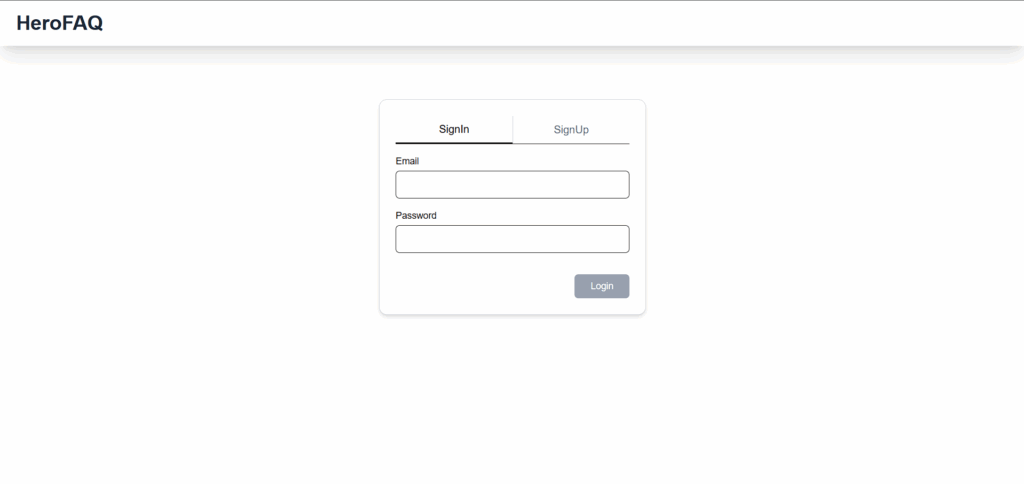
Hero FAQ employs a modern frontend architecture using Next.js with Tailwind CSS for styling and Amplify UI components for authentication flows. This separation of concerns allows for:
- Responsive Design: Tailwind CSS provides utility-first styling for optimal user experience across devices
- Authentication UI: Amplify UI components handle complex authentication flows with minimal setup
- Type Safety: Full TypeScript integration ensures compile-time error checking and improved developer experience
- Performance: Next.js optimizations including server-side rendering and automatic code splitting
The frontend implementation leverages the Amplify Authenticator component, which automatically integrates with the backend authentication configuration to provide complete sign-in, sign-up, and sign-out functionalities. This approach significantly reduces development time while maintaining security best practices.
Setting Up Amplify Data for Hero FAQ
Hero FAQ’s data architecture utilizes AWS DynamoDB for scalable data storage, accessed through AWS Amplify DataStore and GraphQL API. This setup provides secure, real-time data management for all application components.
Data Schema Definition (amplify/data/resource.ts):
					import { type ClientSchema, a, defineData } from '@aws-amplify/backend';
import { postConfirmation } from "../auth/post-confirmation/resource";
import { UserModel } from './models/UserModel';
import { QuestionModel } from './models/QuestionModel';
import { AnswerModel } from './models/AnswerModel';
import { FormModel } from './models/FormModel';

const schema = a.schema({
  userModel: UserModel,
  questionModel: QuestionModel,
  answerModel: AnswerModel,
  formModel: FormModel,
}).authorization((allow) => [
  allow.authenticated(),
  allow.resource(postConfirmation)
]);

export type Schema = ClientSchema<typeof schema>;

export const data = defineData({
  schema,
  authorizationModes: {
    defaultAuthorizationMode: 'userPool',
  },
});
This schema architecture defines four core models that work together to provide comprehensive form management:
UserModel: Manages user profiles, roles, and associated metadata, ensuring proper user identification and role-based access control throughout the application.
FormModel: Handles form definitions, metadata, and configuration settings, providing the foundation for dynamic form creation and management by administrators.
QuestionModel: Stores individual form questions, their types, validation rules, and display configurations, enabling flexible form structures and user interaction patterns.
AnswerModel: Manages user responses and submissions, maintaining data integrity and providing audit trails for all form interactions.
The authorization configuration uses userPool as the default mode, ensuring that all data access is authenticated and properly controlled based on user roles and permissions.
Automatic Feature Generation
Each model in the Hero FAQ schema automatically generates essential cloud infrastructure:
- DynamoDB Tables: Secure, scalable data storage with automatic scaling and backup capabilities
- GraphQL API: Complete CRUD operations with real-time capabilities and type-safe queries
- Real-time Subscriptions: Live updates for collaborative features and instant data synchronization
- Automatic Timestamps: Built-in createdAt and updatedAt fields for audit trails
- Type-safe Client: End-to-end TypeScript integration for improved developer experience
Role-Based Access Control Implementation
Hero FAQ implements sophisticated role-based access control through multiple layers:
Profile Groups: Define distinct user roles such as Admin and Regular User, each with specific permissions and capabilities within the application.
Post-Confirmation Triggers: Automatically assign appropriate roles during the user signup process, ensuring proper access control from the moment of account creation.
Authorization Rules: Control data access and operations based on user groups, implementing fine-grained permissions for different application features.
This approach ensures that Admins can create and manage forms, view comprehensive analytics, and manage user permissions, while Regular users can access assigned forms, submit responses, and view their personal submission history.
At Compileinfy, our Hero FAQ implementation demonstrates several key technical advantages:
Secure Authentication: Email-based login with automatic role assignment ensures robust security while maintaining user experience simplicity.
Scalable Data Architecture: Modular schema design promotes maintainability and enables future feature expansion without architectural changes.
Real-time Capabilities: Live updates for admin dashboards and form interactions provide immediate feedback and enhanced user engagement.
Type Safety: End-to-end TypeScript integration eliminates runtime errors and improves code quality through compile-time validation.
Future Enhancement Roadmap: Our implementation is designed to accommodate upcoming features including advanced analytics dashboards, comprehensive data export functionality, automated email notifications via AWS SES, and file upload capabilities with S3 integration.
Next Steps
With the foundational authentication and data management systems in place, Hero FAQ can be extended with advanced features and optimizations. In our next article, we’ll explore the detailed implementation of data models and GraphQL APIs, demonstrating how to build robust, type-safe data layers that seamlessly integrate with your authentication system.
AWS Amplify Gen 2 provides an exceptional foundation for building sophisticated applications like Hero FAQ, enabling developers to focus on business logic while Amplify handles infrastructure complexity. Our implementation showcases how modern cloud-native development can deliver powerful, scalable solutions efficiently.
Stay tuned for our next article where we’ll dive deep into data models and GraphQL APIs, demonstrating how to build robust backend using AWS Amplify Gen 2, type-safe data layers that power your full-stack applications.